
By Harper Lee, Social Media Specialist
Instagram’s map feature, introduced as part of its evolving platform in 2025, lets users tag locations in posts and explore nearby content on an interactive map. This tool is perfect for discovering local hotspots, sharing travel adventures, or promoting businesses, but it also raises privacy concerns for some users. Whether you want to make the most of this feature or turn it off entirely, we’ve got you covered. Here’s a step-by-step guide to using or disabling Instagram’s map feature on your iOS or Android device, ensuring you stay in control of your social media experience.
What Is Instagram’s Map Feature?
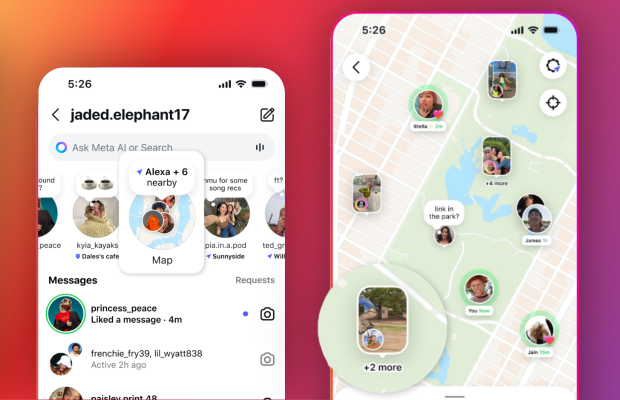
Instagram’s map feature enhances location-based sharing by integrating geotags into a browsable map interface. When you tag a post with a specific location, it appears on Instagram’s Explore Map, allowing users to find content from nearby places or popular destinations. For example, tagging a café in New York City lets others discover your post when browsing that area. The feature also supports Story Highlights, letting you pin location-tagged stories to your profile for followers to explore.
While it’s a fun way to share experiences or boost visibility for businesses, the map feature can reveal your precise location, which may concern privacy-conscious users. By default, location tagging is optional, and you can control whether your posts appear on the public map. Below, we detail how to use the feature effectively or disable it to protect your privacy.
How to Use Instagram’s Map Feature
Follow these steps to make the most of the map feature on Instagram:
- Update Your App: Ensure you’re running the latest version of Instagram (check the App Store or Google Play for updates).
- Create a Post or Story: Take a photo or video, or select one from your gallery, and proceed to the posting screen.
- Add a Location Tag: Tap the location pin icon and choose a nearby place or search for a specific spot. You can select from suggested locations or use GPS to pinpoint a custom one.
- Post to the Map: When sharing, ensure the “Add to Map” toggle is enabled (it’s on by default for public accounts). This makes your post visible on Instagram’s Explore Map.
- Explore the Map: From the Explore tab (magnifying glass icon), tap the map icon to browse posts from your location or other areas. Zoom in or out to discover content globally.
- Pin to Highlights: For Stories, add a location tag and save it to a Highlight on your profile. Followers can view your location-based Stories via the map interface.
Tip: Businesses can use precise geotags to attract local customers, while travelers can create virtual travel journals by tagging destinations. Always double-check your privacy settings to control who sees your posts.
How to Turn Off Instagram’s Map Feature
If you prefer to keep your location private or avoid appearing on the public map, you can disable the feature:
- Open Settings: Launch Instagram, go to your profile, and tap the three-line menu (top-right corner). Select “Settings and Privacy.”
- Adjust Location Settings: Scroll to “Your Activity” and tap “Posts.” Find the “Location Sharing” or “Add to Map” option and toggle it off to prevent new posts from appearing on the map.
- Remove Existing Tags: To delete location tags from past posts, go to “Your Activity,” select “Posts with Locations,” and edit or remove tags individually. For Stories, delete or edit Highlights with location tags.
- Disable Device Location: For extra privacy, turn off location services for Instagram in your phone’s settings (iOS: Settings > Privacy > Location Services; Android: Settings > Apps > Instagram > Permissions).
- Switch to Private Account: Set your account to private (Settings > Privacy > Account Privacy) to limit who can see your posts, even if they’re tagged with a location.
Note: Disabling the map feature doesn’t affect your ability to tag locations for personal use, but it prevents your posts from appearing on the public Explore Map. Check your settings periodically, as updates may reset preferences.
Why This Matters
Instagram’s map feature is a powerful tool for creators, businesses, and travelers looking to share location-based content or discover new places. It enhances engagement by connecting users with local communities or global destinations, making it ideal for promoting events or exploring trending spots. However, the feature’s public nature can expose your whereabouts, so disabling it is a smart move for those prioritizing privacy, especially younger users or those in sensitive situations.
Compared to similar features on platforms like Snapchat’s Snap Map, Instagram’s version offers more granular control, letting you opt out of public sharing without disabling location tags entirely. As social media evolves, balancing connectivity with privacy remains key, and Instagram’s flexible settings empower users to choose what’s right for them.
Final Thoughts
Instagram’s map feature in 2025 opens up exciting ways to share and explore location-based content, whether you’re showcasing a favorite café or planning a travel itinerary. For privacy-conscious users, disabling the feature is straightforward, ensuring you control what’s shared. Whether you embrace the map or opt out, Instagram keeps your social experience customizable. Ready to tweak your settings? Update your Instagram app and explore our social media guides on GetTechBite for more tips to enhance your online presence!